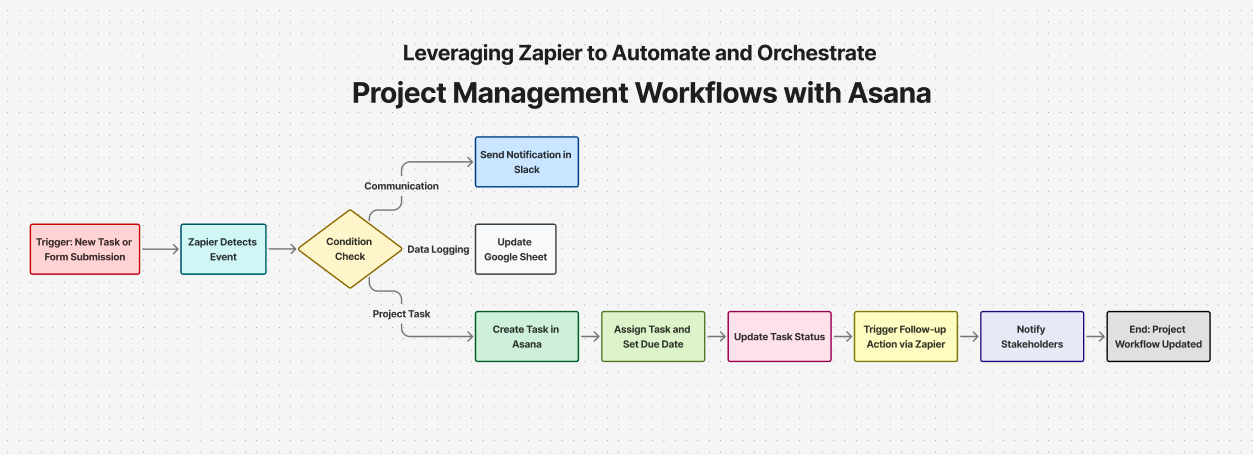

In an era where productivity hinges on automation, the tools you choose to streamline your workflows can make or break your operational efficiency. Whether you’re a solo founder juggling five apps or a fast-growing team trying to keep your systems in sync, automation platforms are the unsung heroes behind the scenes.
Today, we’re comparing three of the biggest names in no-code/low-code automation: Zapier, Make.com (formerly Integromat), and n8n. Each one offers a different approach to building workflows—but which one’s right for you?
Let’s break it down.
Zapier: The Veteran with Simplicity in Mind
Zapier is often the first tool people think of when it comes to automation—and for good reason. It’s been around since 2011 and has built a reputation for being intuitive, reliable, and beginner-friendly.
- Strengths: Wide integration library: With over 6,000 apps supported, Zapier likely connects with whatever stack you’re using.
- Ease of use: You can build simple “if-this-then-that” flows (called Zaps) in minutes.
- Great for business teams: Especially useful for marketing, sales, and ops teams without technical backgrounds.
- Limitations: Limited complexity: Multi-step logic, conditional paths, or advanced data handling aren’t Zapier’s strong suits.
- Pricing: While the free tier exists, serious automation quickly bumps you into pricier plans.
- Best for: Teams that want quick wins, minimal setup, and a large app ecosystem.
Make.com: Power and Flexibility in a Visual Canvas
Make.com takes things a step further—offering a visual, drag-and-drop interface where automations (called scenarios) can branch, loop, and filter based on deep logic.
Strengths:
- Visual interface: You literally “see” your automation flow, making it easier to debug and iterate.
- Advanced logic support: Routers, iterators, and built-in data manipulation give you much more control.
- Affordable pricing: Offers more power for your money, especially on lower tiers.
Limitations:
- Steeper learning curve: The interface can feel overwhelming at first, especially for non-technical users.
- Occasional complexity: Advanced scenarios might require knowledge of APIs or data structures.
- Best for: Ops teams, freelancers, and businesses that need complex logic but don’t want to code.
n8n: Open-Source Flexibility with Developer Muscle
n8n (pronounced “n-eight-n”) is a lesser-known but increasingly popular platform—especially in developer circles. It’s an open-source automation tool that can be self-hosted or used in the cloud.
Strengths:
- Open-source and self-hostable: Perfect for teams that want control over data and privacy.
- Deep customization: You can write JavaScript code, call APIs, and build powerful logic directly into workflows.
- Community-driven: New integrations are constantly added, and you can create your own nodes.
Limitations:
- Technical expertise required: Not built for casual users. Even setting it up requires some dev knowledge.
- Smaller integration list out of the box: You may need to create custom nodes for niche tools.
- Best for: Developers, data teams, and privacy-focused organizations with in-house technical talent.
Features | Zapier | Make.com | n8n |
|---|---|---|---|
Learning Curve
| Low | Medium | High |
Visual Builder
| Basic | Advance | Advance |
API/Webhook Support
| Yes | Yes | Yes (Advance) |
Conditional Logic
| Basic | Strong | Strong |
Code Injection
| No | Limited | Full JS Support |
Hosting | Cloud Only | Cloud Only | Self Hosted or Cloud |
Final Thoughts:
Automation Isn’t Optional Anymore
No matter which tool you choose, one thing is clear: automation isn’t a nice-to-have. It’s your ticket to operational efficiency, faster scale, and a whole lot less copy-pasting between apps.
In 2025, automating the busywork is no longer an edge—it’s table stakes. So don’t wait. Choose the platform that matches your team’s skills and goals, build a few core automations, and scale from there. Your future self will thank you.